Disadvantages of “high resolution”


Free Download Mp4Gain
picture

Disadvantages of “high resolution”

Hi-Res Audio

High sound quality has the downside of data.

Hi-Res Audio

Since this is digital data, the greater the amount of information, the greater the data capacity. Therefore, the amount of data from the high-resolution sound source is also quite large.

The capacity of each sound source per song for 5 minutes is as follows.

“Mp3 (normal sound quality)” =
“7.2MB” “CD” = “52.9MB”
“High resolution (such as 96 kHz/24 bit)” = “168.6 MB”

A 16 GB SD card only supports about 10 albums. It costs money

How to get and listen to Hi-Res sound source?
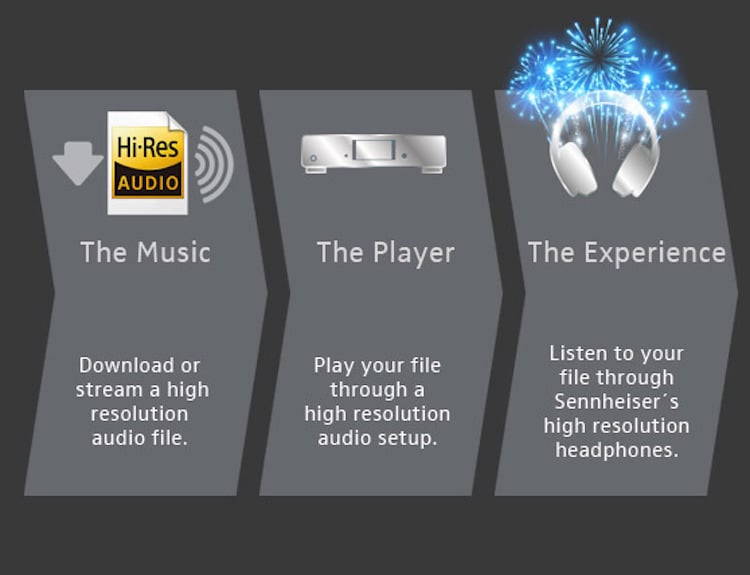
Due to the large capacity of Hi-Res Audio sources, they won’t fit on existing CDs, so you must purchase them through a music distribution site that handles Hi-Res music.
Currently, Hi-Res Audio sources can be purchased from music distribution sites such as “e-onkyo music”, “mora” and “HDtracks”.
If the demand for high resolution increases in the future, it can be handled by “iTunes”, etc.

Also, even if you get a sound source, you basically can’t enjoy high-quality sound unless you use a “high-resolution compatible” playback device, so be careful.

Although it is a “high resolution” that does not give the impression that the current situation is a bit high, it is an opportunity to listen to the songs of your favorite artist with better sound quality, and it will surely be a new musical experience. .

There are also electronics retail stores where you can hear them, so why not look for a viewer when you pass by?


Free Download Mp4Gain
picture


Mp4Gain Main Window
picture


Mp4Gain Features
picture


Free Download Mp4Gain
picture

What is the difference between “high resolution”?

What is the difference between “high resolution”?

Hi-Res

What are the advantages and disadvantages?

Hi-Res Audio

The keyword “high resolution” suddenly increasing its presence due to the proliferation of downloadable sound sources.
Even if you know that “high resolution” = “high sound quality”, there are not many people who really understand what is different from the conventional.

In this article, I will introduce how to listen to Hi-Res from the difference between “Hi-Res” and conventional sound.

What is high resolution?
High Resolution is an abbreviation for “High Resolution Audio” and means a high resolution sound source.
High resolution is used here to refer to “a digital sound source with an amount of information that exceeds the sound quality of a CD.”

So what does it mean to be a “digital sound source that exceeds the sound quality of a CD”?

High resolution sound source definition.
The sound quality of a digital sound source is determined by how accurately it is converted into a digital signal. The more information there is, the better the sound quality.

A sound source that can be called high resolution requires that the “sample rate” and “bit depth” exceed the level of the CD. I think it is an unknown word, so I will briefly explain this point.

The sound source on the CD has a “sampling rate of 44.1 kHz/s” and a “bit depth of 16 bits”.

“Sample rate” refers to “the amount of information divided per second,” and the higher the number, the smoother the sound.
On the other hand, “bit depth” refers to “data capacity per information divided”, and the larger the number, the greater the expressiveness of the sound.

Also, there is a unit called “bit rate (kbps)” when importing a CD or selecting sound quality with a streaming service.
This is the product of “sample rate”, “bit depth” and “number of channels (monaural = 1 / stereo = 2)”, and is a unit that expresses the goodness of the sound quality. Likewise, the higher the number, the higher the sound quality.

What is a high resolution sound source?

What is a high resolution sound source?

Hi-Res

High-Resolution Audio is audio that has a higher sound quality than CDs. High resolution is an abbreviation for high resolution. High resolution means high resolution.

High-Resolution Audio

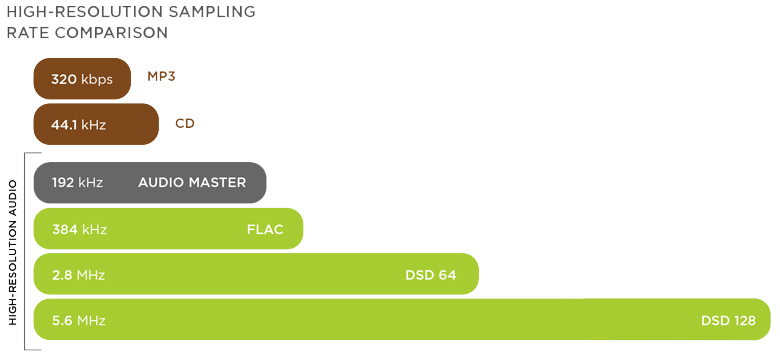
The sound source of a music CD ( CD-DA ) is recorded at 16-bit/44.1 kHz, while the sound source of 24-bit/96 kHz or higher is often referred to as a high-resolution sound source.

high resolution format
write Sampling frequency Bit depth Amount of information per second Difference in data volume on the CD
CD sound quality PCM 44.1KHz 16bit 705.6Kbps 1x
High resolution sound quality PCM 96KHz 24bit 2304Kbps 3.3 times
Hi-Res Sound Quality PCM 192KHz 24bit 4568Kbps 6.5 times
Sound quality DSC64 SACD 2.8224MHz 1 bit 2822.4Kbps 4.0 times
DSC128 5.6648MHz 1bit 5564.8Kbps 8.0 times
The sound gradation that can be expressed by the bit depth of PCM is as follows.

Sound gradation that can be expressed in 16 bits 2 16 gradation = 65,536 gradation
Sound gradation that can be expressed in 24 bits 2 24 gradation = 167,77,216 gradation
FLAC and ALAC lossless compression
ALAC of FLAC is a method of lossless compression. With the lossless compression method, the data before and after compression is exactly the same. Therefore, the sound quality does not deteriorate like MP3.

what is the difference between “high resolution”? Part 2

what is the difference between “high resolution”? Part 2

Hi-Res

How to get and listen to Hi-Res sound source?

{Hi-Res}

Due to the large capacity of Hi-Res Audio sources, they won’t fit on existing CDs, so you must purchase them through a music distribution site that handles Hi-Res music.
Currently, Hi-Res Audio sources can be purchased from music distribution sites such as “e-onkyo music”, “mora” and “HDtracks”.
If the demand for high resolution increases in the future, it can be handled by “iTunes” etc.

Also, even if you get a sound source, you basically can’t enjoy high-quality sound unless you use a “high-resolution compatible” playback device, so be careful.

Although it is a “high resolution” that does not give the impression that the current situation is a bit high, it is an opportunity to listen to the songs of your favorite artist with better sound quality, and it will surely be a new musical experience. .

There are also electronics retail stores where you can hear them, so why not look for a viewer when you pass by?

what is the difference between “high resolution”?

what is the difference between “high resolution”?

Hi-Res

What are the advantages and disadvantages?

Hi-Res

The keyword “high resolution” suddenly increasing its presence due to the proliferation of downloadable sound sources.
Even if you know that “high resolution” = “high sound quality”, there are not many people who really understand what is different from the conventional.

In this article, I will introduce how to listen to Hi-Res from the difference between “Hi-Res” and conventional sound.

What is high resolution?
High Resolution is an abbreviation for “High Resolution Audio” and means a high resolution sound source.
High resolution is used here to refer to “a digital sound source with an amount of information that exceeds the sound quality of a CD.”

So what does it mean to be a “digital sound source that exceeds the sound quality of a CD”?

High resolution sound source definition.
The sound quality of a digital sound source is determined by how accurately it is converted into a digital signal. The more information there is, the better the sound quality.

A sound source that can be called high resolution requires that the “sample rate” and “bit depth” exceed the level of the CD. I think it is an unknown word, so I will briefly explain this point.

The sound source on the CD has a “sampling rate of 44.1 kHz/s” and a “bit depth of 16 bits”.

“Sample rate” refers to “the amount of information divided per second,” and the higher the number, the smoother the sound.
On the other hand, “bit depth” refers to “data capacity per information divided”, and the larger the number, the greater the expressiveness of the sound.

Also, there is a unit called “bit rate (kbps)” when importing a CD or selecting sound quality with a streaming service.
This is the product of “sample rate”, “bit depth” and “number of channels (monaural = 1 / stereo = 2)”, and is a unit that expresses the goodness of the sound quality. Likewise, the higher the number, the higher the sound quality.

If the sound quality of the CD is the pixel art Mario from the Famicom, is it easy to imagine that the high resolution sound quality is as accurate as the pixel art Mario from the Super Nintendo?

The sound is good! That is why the disadvantages of “high resolution”
High sound quality has the downside of data.
Since this is digital data, the greater the amount of information, the greater the data capacity. Therefore, the amount of data from the high-resolution sound source is also quite large.

The capacity of each sound source per song for 5 minutes is as follows.

“Mp3 (normal sound quality)” =
“7.2MB” “CD” = “52.9MB”
“High resolution (such as 96 kHz/24 bit)” = “168.6 MB”

A 16 GB SD card only supports about 10 albums. It costs money

What is the difference between 16 bit and 24 bit? Part 2

What is the difference between 16 bit and 24 bit? Part 2

16 bits vs 24 bits

By the way, “32-bit” and “32-bit floating point” are completely different things, and you can think of 32-bit and 24-bit floating point as almost the same thing in terms of recording.

16 vs 24 bits

32-bit floating point audio interfaces are commonly sold.

What about 16 bit?
On the other hand, in the case of 16-bit recording, the dynamic range is originally smaller (96 dB) than that of 24-bit, so the noise ratio is relatively large. As a result, the effective range of dynamic range is typically around 80 dB, and the s/n ratio is considerably less than 120 dB in the 24-bit case. That is, although the noise is the same, it will be more noticeable when recording in 16bit than in 24bit.

Let’s aim to create sounds that are aware of the staging!
Paying attention to the input of these recordings is part of a basic and important task called “gaining stage direction.”

Gain, to put it bluntly, is volume. It is very important to manage gain in every music production process, from recording, to produce clear music with less sound pressure control, noise and distortion.

There are many ways to get a staging, but if you understand the concept correctly, it’s not particularly difficult or expensive.

Analog VU MeterOne of the most underrated gain staging tools, the “VU meter”. You can solve many problems by using it correctly with a digital meter, and it’s installed as standard in most DAWs.
The reason beginners are often confused by “clear sound quality” and “sound pressure” is that knowledge about this gain staging is not that widespread. There is an avalanche of information that prints “all you need is this gear and plug-ins”, “you need a professional studio”, and “everything is decided by professional mixing and mastering” without telling you the specific job. As long as you have the right knowledge and can figure it out, you don’t need any of these at all, and that’s why the standard Pro Tools features are more than enough.

An ally that stands strong against the shortcomings of the home recording environment! Use VU meters and RMS meters to help control sound pressure!

How to record in 24 bit
First of all, it’s an important premise that both your audio interface and DAW support 24-bit, but if you go for a normal lineup these days, there’s almost no case that it won’t, so rest assured. Let’s see what is needed for both configurations.

Audio Interface Configuration
If you’re using a recent audio interface, you don’t have to worry about that, as you can record at 24-bit or similar settings without any configuration, regardless of price. Make sure only the driver for the interface is installed correctly.

Especially for Windows users, if you use the Windows Default Driver (WDM) instead of the ASIO driver, unexpected problems such as not being able to fully utilize the capabilities of the audio interface and automatically handling it at 16-bit will occur. to verify that the correct driver is installed correctly.

What is the difference between 16 bit and 24 bit?

What is the difference between 16 bit and 24 bit?

16 bit vs. 24 bit Audio


Relationship between the number of recording bits and noise

Bit depth

Tips and production methods

I’m not sure if I should choose 16-bit or 24-bit when creating a new DAW session! What are the benefits and what are you looking for? Let’s take a look at how bit count is handled in recording in relation to the concept of “gain staging” which is indispensable to music production.

The larger the s/n, the clearer and more faithful the recording will be.
You may have often seen the expression “the s/n ratio is…” in computer reviews. s/n means “signal to noise ratio” and is read as “s/n ratio” in Japanese. Every time you record, you need to consider the effect of noise, but simply put, s/n is an index of how noise sounds, and the higher this number, the more noticeable the noise is to essential audio. that will disappear

In terms of sound quality, the first step in sound is recording. Therefore, if you want to achieve the clearest possible sound quality that is faithful to the original sound, it is desirable to achieve as high a s/n (discrete noise) ratio as possible from this stage. The question of “Which is better, 16bit or 24bit”, which is the topic of this time, is actually deeply related to this concept of y/n.

Relationship between dynamic range and background noise
The biggest difference in sound quality between 16-bit and 24-bit is the difference in dynamic range.

Dynamic range is an expression that expresses the difference between the smallest sound and the loudest sound, but when you think of dynamic range in terms of the number of overlay bits, you think of it as “audio resolution”, and in a great I feel that it is almost no problem.

The 16-bit dynamic range is 96 dB, while the 24-bit dynamic range is 144 dB, which is quite a difference. High-resolution audio is especially important in terms of “noise countermeasures” as well as being able to reproduce the fineness of sound more faithfully.

Relationship Between Dynamic Range and Background NoiseAn example showing the relationship between noise and dynamic range in a 24-bit recording. The red waveform represents noise and the green waveform represents audio. In general, the higher the dynamic range, the better the s/n ratio.
The “noise floor” in the figure above represents the range occupied by the background noise generated by the equipment. The wider the dynamic range, the lower the noise ratio (increases s/n). In the figure, the standard noise floor for 24-bit recording is set to -120 dB, but the actual effective dynamic range in this case is about 120 dB.

By the way, the human audible range is said to be only about 120 dB, and this is why it is generally said that “it is not necessary to record with a bit count of 24 bits or more”. part being used. Occasionally I see jokes that assume they don’t exist, saying “32 bit audio interface is for cats”, but that’s the reason behind it.

What is bit depth?

What is bit depth?

Definition and description of bit depth

Digital audio requires certain values ​​to be set to describe the resolution of the sound data (sample) that is captured and stored in the audio file. This attribute is called bit depth.

Similarly, for image and video files, this measurement range is also used to determine the resolution of the image. The higher the bit depth (for example, 16-bit vs. 24-bit), the better the image.

This attribute is exactly the same as digital audio. Therefore, a higher audio bit depth provides a more detailed sound recording.

Bit depth is often confused with bit rate, but they are very different. Bitrate (measured in Kbps) is the data throughput per second when the sound is playing, not the resolution of the individual samples that make up the audio waveform. See Bit Depth and Bit Rate for more information.

Note: Bit depth is sometimes called sample format, audio resolution, or word length.

Bit depth details
The unit of measure for bit depth is a binary number (bit), and the precision doubles for each increase in bits. This bit range is an important integer that determines how good a recording (for example, part of the music) sounds.

If the bit depth is too low, the recording will not be very accurate and you may lose a lot of quiet sound. For songs that make up a digital music library, MP3s encoded in a high-bit-depth PCM audio format (usually WAV ) have low bit depth compared to those encoded from the original PCM file.

Therefore, in theory it is much more accurate during playback. As mentioned above, bit depth is especially important when dealing with the quiet harmonics of a song, as frequencies are lost if the bit depth is set too low.

Bit depth is relevant only within the range of the PCM signal. Therefore, there is no bit depth in the lossy compressed audio format.

Everything musicians need to know about audio file formats pArt 3

Everything musicians need to know about audio file formats pArt 3

sample rate

WAV is at the top of the sound quality pyramid. So to speak, WAV is a Cadillac luxury car audio format. WAV files sound cleaner and sharper than other compressed formats.

Audio Sample Rate

If you want to submit your demo sound source to a label, sell it to a publisher, or publish it in a medium like a blog, I recommend WAV. In such a case, you will need a mastered WAV file.

1512-38_mixtape-700×366

WAV files represent the highest quality sound you can produce and signify your own sound.

Always use WAV (input sound source) file material when mastering your own music.

WAV can be converted to other file formats at a later time, so WAV can meet the needs of any file format.

The only downside to WAV is that its large file size quickly fills up free space on your hard drive. If you only use WAV when listening to music, it means that the capacity of your computer, smartphone, iPod and Dropbox will soon be exhausted.

But when it comes to your own music, you’ll need to archive all your tracks to WAV.

Most music distribution platforms require WAV for the music upload file format they offer. For example, iTunes and Amazon MP3 require high quality WAV upload.

320MP3
The 320kbps MP3 is probably the most widely used file format. The reason is that 320 MP3 has good sound quality and file size.

320 MP3s are compressed into manageable file sizes. However, when I play it, it sounds rich.

If you’re streaming online, around 320kbps will be a good balance. For example, Spotify’s high-quality mode streams at 320 kbps.

The 320 MP3 is an excellent choice for saving hard drive space and loading time and sharing your music with realistic, high-quality sound.

192MP3
192 kbps MP3 is used instead of geta. If you need a sense of speed and want to make sharing easier, this fast and slightly grainy MP3 will come in handy.

The 192 MP3 is useful for quickly finding and sharing sound sources when sending a large number of files at once or listening to the entire back catalogue.

Bitrates below 320 kbps make sound quality even worse, but you may not even notice a difference. Test to see if you can tell the difference with your ears.
The 192MP3 is the perfect tool for musicians to share and stream music efficiently and quickly.

Tip: If you have a streaming player on your site, using a 192kbps MP3 will make it load faster.

What is the best way to use each file format?
Each format has its own uses, and the choice of format for that use depends on the intended use and environment.

Think about what sounds you are sharing or where you are sharing them. Does the file format you choose fit?

Using WAV as the output format for mastering is probably the most custom option. Also, if you have a mastered WAV, it’s very easy to convert it to other file formats.

Formatting has become a very important factor for streaming generation. Choose a format that is smart and easy to use.

Everything musicians need to know about audio file formats part 2

Everything musicians need to know about audio file formats part 2

Sample Rate

Now that you understand what music file compression is, are you wondering how each file format is compressed?
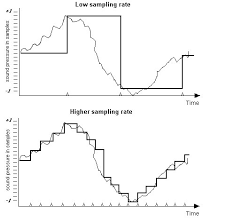
Audio Sample Rate

Let’s talk about the compression method for each file.

How to compress each file format
uncompressed format
Uncompressed files are, of course, completely uncompressed. The most commonly used uncompressed file formats are WAV or AIFF.

These formats are the type of format that is often used when exporting files from your DAW. If you duplicate a track with WAV, the duplicate WAV file will be a copy of the original sound.

lossless compression
Although lossless files are compressed, they are only compressed as WAV and retain the original amount of information. Lossless files are only decompressed when you open the file.

The most common lossless format is FLAC. Apple also has its own format called ALAC, so if you have a relationship with iTunes, you’ll probably use ALAC.

FLAC makes the file size smaller than WAV and preserves the original amount of information, but the file size still tends to be large.

rose compression
Compressed Rossy files are probably the most widely used audio format. MP3s are the most used. However, other file formats like OGG, WMA, AAC are also included in Rossie’s compression.

The downside of Rossy compression is that it causes “sound degradation” which actually occurs when the amount of information in the original data is removed.

However, the advantage is that the smaller size makes loading faster and requires less space to store data.

Files with lossy compression can be divided into high resolution and low resolution depending on how much they are compressed. High-quality files lose less information.

The truth about bitrate
It is the bit rate that determines the sound quality of audio files.

The bit rate indicates the amount of data processed per second. In the case of MP3, it is the part that is displayed as 320 or 192. In other words, the larger the size, the greater the amount of data packed and the better the sound quality. By the way, how to calculate the bitrate for sound quality:

Sampling rate (Hz) x bit depth (bit) = bit rate (bps)

* Is the sample rate divided into tens of thousands per second to sample the sound? Bit depth is the amount of data per divided sample.

For example, an MP3 file with a bit rate of 320 has a data volume of 320 kilobits (320 kbps for short) per second.

Uncompressed WAV and AIFF files are typically 1411 kbps.

Increasing the bit rate means that more data is processed per second. The more data you have, the better the sound. Don’t you think it’s very simple?

Now, did you understand the basics of compression, file format, and bitrate? Let’s continue.

The following is a question that is easy to catch fire.

What is the best way to use each file format?
If we were to cover all audio formats, it would take hours to finish reading. Readers have their own things to do and make music, right?

So the answer is simple, and I will list only three commonly used file formats. It is WAV, MP3 320kbps, MP3 192kbps.