
Digitized sound
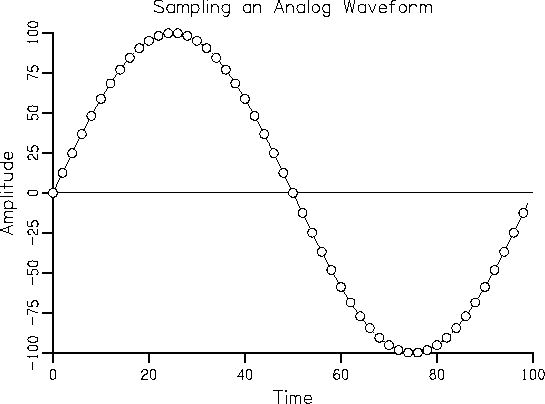
To digitize sound, it must be digitized. An analog signal is digitized by measuring instantaneous signal levels and sequentially writing these values to a file. In the figure, the measured values on the original curve are marked with dots.
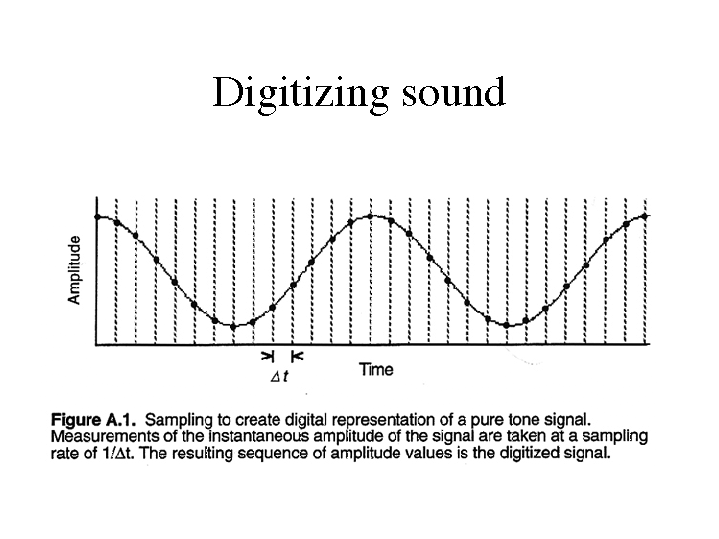
Digitize an input analog signal
There are intervals between measurements, the duration of which is determined by the sampling frequency. The higher the sample rate, the shorter the interval and the more accurately the original waveform will be repeated. That is, the sample rate determines the acceptable frequency range of the input signal. By the Kotelnikov-Shannon theorem, it should be twice the maximum frequency of the measured signal. This is where the 44 kHz sample rate comes from. This is twice the frequency of sound that a person can hear, in theory. This is what it is: on CD. The new storage formats for digitized audio, DVD-Audio and Super AudioCD mean even higher sample rates (up to 192 kHz).
Let’s look at the image again. There is something wrong. After all, the signal from one measurement to another can change several times, which means that the sample rate is chosen much lower than required, and as a result, the signal is digitized with large distortions. The signal with the required sample rate will look like the following figure. As you can see, in this case, the difference in measurements can really be overlooked.
Another important parameter is the conversion bit depth. Determines the accuracy of the measurement of the instantaneous magnitude of the signal. The signal is measured with a step corresponding to an interval of the maximum number of intervals into which the signal is conventionally divided during the measurement. Therefore, the conversion precision is ± 1 interval. 8-, 16-, and 20-bit conversions are commonly used. (For AudioCD, the bit depth of the sound corresponds to 16 bits, for more advanced media – 20 bits). The bit depth of the conversion is determined by the sound card, that is, the ADC, with which the signal is digitized. For example, when converting an input signal with a maximum value of 100 percent with an 8-bit converter, the signal error will be 100/28 = ± 0.4 percent, and for a 16-bit conversion, 100 / 216 = ± 0.0015 percent. To clarify these dry numbers, consider the “digitizing” process in the figure. For clarity, we’ll assume our soundcard’s ADC is three-bit (how awful!). The dotted line shows the result of the input signal conversion. Consequently, the error in this case is huge: 100/23 = ± 12.5 percent. So we see that the higher the bit depth of the conversion, the more accurately the shape of the original signal is repeated.
Naturally, both with an increase in the sample rate and an increase in the conversion bit depth, the volume of the final file increases geometrically. The standards for modern sound cards are: 44 kHz sample rate and 16-bit conversion. With these settings, the file size is approximately 10MB for 1 minute of sound. This is a lot, even with modern hard drive volumes, not to mention portable devices.


