
Digital audio quality
Several elements work together to define the sampling process:
The frequency with which the converter takes a sample (the sampling frequency)
The precision with which you can represent a sample as a number (the bit depth).
It is important in any digital capture device, such as our sound cards, to record enough information to provide an accurate record of the sound signal.

The sampling rate you choose determines how much frequency range you can record, and the bit depth precisely determines how you can record changes in the level of the analog signal; which affects the dynamic range and, therefore, the residual amount of noise in the signal.
Sample rate and frequency range
Individual samples viewed in an audio editor
Individual samples viewed in an audio editor
The sampling rate is the frequency with which the A / D converter measures the signal level. The samples are broadly analogous to a series of snapshots. If the converter takes ten samples of the signal every second, it has a sampling rate of 10 Hz.
The frequency range of an A / D converter is determined by the sampling frequency. The highest frequency that can be picked up is only half the frequency at which the drive operates.
For example: a 10 Hz sampling rate can capture a maximum of 5 Hz frequency, not 10 Hz.
According to the Nyquist-Shannon theorem, to sample frequencies up to the upper limit of the human ear (which is around 22000 Hz), we need a sampling frequency of around 44000 Hz, which is, not by chance, the rate normal sampling for commercial audio CDs.
Bit depth and dynamic range
The sampling frequency tells us how an A / D converter works over time, and therefore how it captures the information of the frequency of the “x” axis of the waveform diagrams.
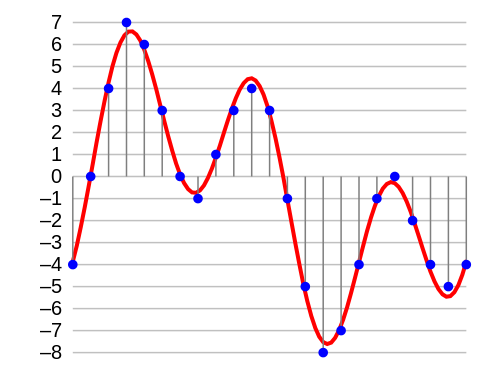
The bit depth determines the amount of detail that can be recorded on the incoming signal level, the “y” axis, of the diagrams.
With each sample, the A / D converter must measure the level of the incoming signal and assign it one of a group of numbers. This number comes from the bit depth and the converter should be limited to these discrete values.
With each added bit, the number of possible sound pressure levels that can be stored doubles. With 16 bits the audio has more than 65000 possible levels of resolution; with 24 bits it has more than 16 million possible levels.
The direct impact of bit depth on signal capture occurs over the dynamic range: the greater the bit depth, the greater the dynamic range or amplitude levels that can be captured before the signal is submerged in the background noise.
Dynamic range is obviously important, because it defines the level of dynamic ranges that our ears can hear. But it also prevents errors created by rounding the numbers (quantization errors) from being heard as noise.
Common sampling rates and bit depths
Summarizing what has been said so far, the resolution of digital audio is measured in terms of:
Sample rate (related to sound frequency range and measured in kHz)
Bit depth (related to amplitude and measured in bits).
These values are more or less equivalent to the resolution of an image and the color depth in digital graphics. Any number is theoretically possible for these values, and sample rates and bit depths can be mixed and matched, but the settings you’ll find most of the time are:
16-bit / 44.1 kHz: The standard for commercial audio CDs. It is also used for consumer CD-Rs and is the most common for computer audio software.
16-bit / 48kHz: The standard for digital video (DV), commercial DVD videos, and digital video broadcasting.
24-bit / 96kHz: The emerging high-resolution format increasingly supported by audio hardware and software, although it has not yet become widespread as a standard in the consumer market for listening to music.
Finally: What sampling frequency do I use?
It may seem counterintuitive to work with audio capable of manipulating frequencies that are above the highest that humans can hear.
However, there are three reasons why we may want to use sampling rates of up to 96 kHz or higher:
The first reason, although debated, is that inaudible frequencies above 22 kHz can have an impact on the audible spectrum, by processing the audio at 96 kHz the sound sounds better or more accurate than at 44.1 kHz. However, it is a matter of opinion: some claim that it can be heard, others that it cannot.


