Review the basics of “high resolution.”

What is the difference between DSD, FLAC, MQA, etc?

There are various formats even if you say “high resolution”. If the format changes, the amount of sound information and thus the sound quality will change, the file size will also change and whether or not the playback device/software will support it will also change, so choosing a format is important. We will explain the main formats incorporating common technologies and unique pieces.
There are several high resolution formats, but…
What is the sampling rate?
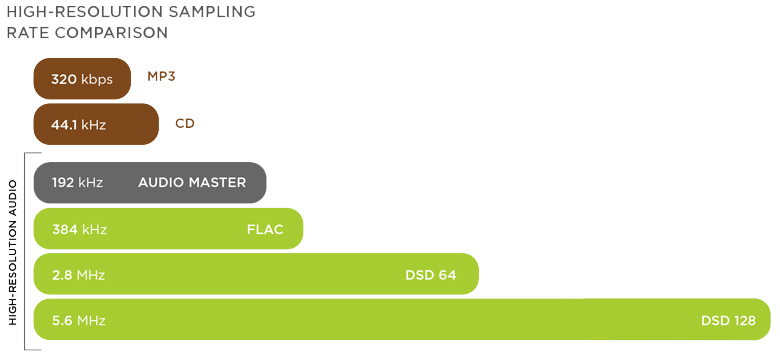
Most digital sound sources are “linear PCM”. This is data obtained by digitizing (sampling) a sound waveform (analog signal) in a fixed cycle, and that cycle is called the “sampling rate”. If the sampling is done every 1/44100 of a second it will be “44.1kHz”, if it is 1/96000 of a second it will be “96kHz”, if it is 1/192000 of a second it will be “192kHz” It means the implementation cycle is shorter and the amount of information is greater. In other words, if you look at this number, you can see “how finely the sound was measured with respect to time”.
What is the number of quantization bits?
A value indicating the number of steps in which the amplitude of a signal is expressed when an analog signal is converted to a digital signal (AD conversion) for linear PCM generation. The larger the value, the finer the amplitude of the sound can be captured, and the waveform (analog signal) of the original sound can be approached, and accurate sound can be reproduced with higher resolution.
The large number of quantization bits is directly related to the resolution of the data. For example, when the number of quantization bits is 1 (1 bit), the width of the expression is 2 steps of “0 or 1”, but in 2 bits, there are 4 steps of “00” and “01”, “10” and “11”. It can be expressed. Similarly, there are 16 steps for 4 bits, 256 steps for 8 bits, 65,536 steps for 16 bits, and 16,777,216 steps for 24 bits, allowing for detailed expression.
The maximum/minimum sound ratio “dynamic range” that the sound waveform data can handle is determined by the number of quantization bits. The dynamic range of the human ear is about 120 dB, but when the number of quantization bits is 16 bits it reaches 96 dB, but when it is 24 bits it reaches 144 dB, and when it is 32 bits it reaches 192 dB . (increases 6 dB for each additional bit) If it’s a high resolution sound source, it can handle everything from tiny sounds to loud sounds with a margin.
Original waveform data. The vertical axis is the sampling frequency and the horizontal axis is the number of quantization bits.
The higher the sample rate (the finer the horizontal axis) and the greater the number of quantization bits (the finer the vertical axis), the richer the information-rich “high resolution” sound.
Definition of “high resolution”
Hi-Res quality audio sources (hereinafter referred to as Hi-Res sound sources), except DSD, are distinguished by the aforementioned sampling rate and the number of quantization bits. The expression “more than CD specifications” is often used, which means that it is based on the CD’s sampling frequency (44.1 kHz) and the number of quantization bits (16 bits).
According to the Japan Electronic and Information Technology Industries Association (JEITA) definition, high-resolution audio must “either the sampling rate or the number of quantization bits exceed the CD specifications” , and hi-res sound sources will follow this.
On the other hand, the Japan Audio Society also defines Hi-Res, and the Recommended Hi-Res logo is awarded to audio equipment that guarantees its playability. This standard is divided into analog and digital systems, and there is also a reference to the file format, such as setting the standard for high resolution sound sources to be “compatible with 96kHz/24bit FLAC and WAV”.