
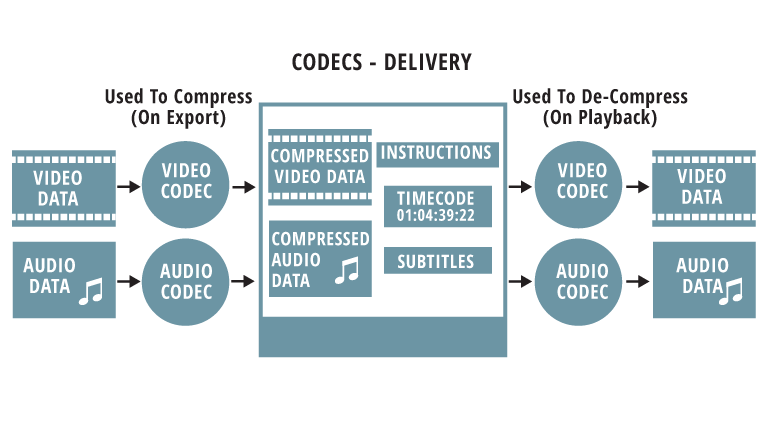
The best format for YouTube videos is codec. The codec is the part of the software that deals with the encoding and decoding of the information that make up the transmission of audio or video. The newer codecs also deal with compression and decompression. Therefore, when coding and decoding the signal, they use mathematical algorithms that can save space at the cost of quality.

compression
When playing video files, compression is performed using mathematical functions that reduce the number of frames per second or the resolution of the pixels that make up the image. In audio files, compression is done by removing the frequencies that cannot be fully perceived by the human ear and the number of bits that make up the sound information.
Container
The best option for the extension is mp4. The frame rate should match the recorded and edited one. The most popular container formats are MKV or AVI.
Video formats
Youtube uses the HD 1080p streaming format and MPEG-2 Steam supports the DVD format and is saved with an .MPG extension. If you cannot send the video in MPEG-2 format, select MPEG-4 format.
MPEG-2
Audio codec: MPEG Layer II and Dolby AC-3
Audio bit rate: 128 kbps or higher
MPEG-4
Video codec: H.264
Audio codec: AAC
Audio bit rate: 128 kbps or higher
Minimal audiovisual duration
The minimum duration is 33 seconds, excluding black and static images on the video channel and silence and background noise on the audio channel.
Frame rates
Videos must have the native frame rate without resampling. For film originals, a progressive master with 24 or 25 frames per second delivers the best results. Frame rates are typically set at 24, 25, or 30 frames per second.
It is not advisable to use resampling techniques as they vibrate the images and often result in poor video quality. Examples: Sampling and transmission like “Telecine Pulldown”.
Dimensions
Videos must use native aspect ratios, and uploaded videos should never contain the black letterbox and pillarbox stripes. The YouTube player uses frames that allow you to view videos correctly without cutting or stretching images.
Video resolution
YouTube wants high-definition videos.
For videos intended for sale and rental, you must specify a minimum resolution of 1920 x 1080 with an aspect ratio of 16: 9.
YouTube does not require a minimum resolution for free content or advertising content, but recommends a resolution of at least 1280 x 720 for videos with an aspect ratio of 16: 9 and a resolution of at least 640 x 480 for videos with an aspect ratio. 4: 3.
If the videos are of poor quality, they will not be visible to the public on YouTube and will be used as a reference for the content ID. These videos generally have a “quarter” (320 x 240) resolution. However, the videos must contain more than 200 lines to create effective references.
Bit rate
The bit rates depend on the codec. This is the number of bits per unit of time (attention! We are talking about bits, not bytes), which is generally measured in kilobits per second. With more format, the quality or resolution of the film or audio, the higher the more information per second. Videos should be optimized based on frame rate, aspect ratio, and resolution, not bit rate.


