
Video Aspect Ratio Correction
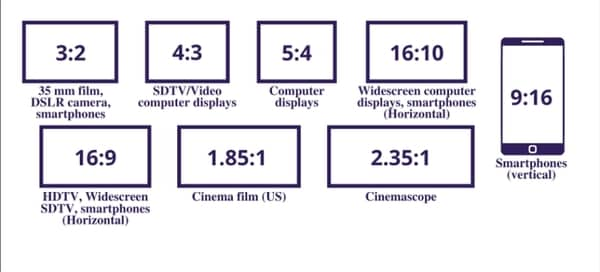
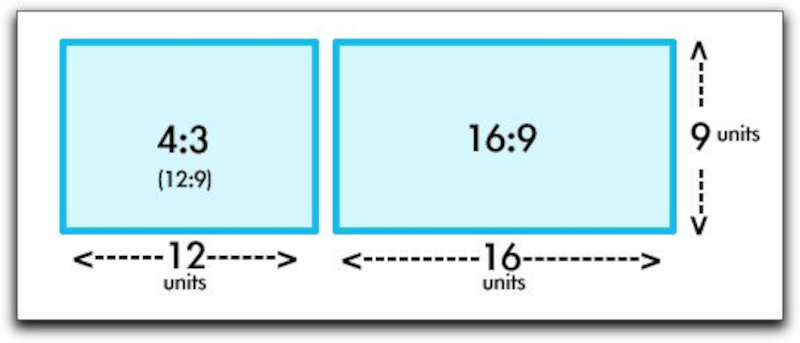
Aspect Ratio Correction in Videos
Video aspect ratios play a significant role in how we perceive and enjoy visual content. Imagine aspect ratios as the frame in which a story is told. The aspect ratio determines the width and height of the video frame, influencing how images and scenes are composed. Think of it like two differently shaped picture frames – one rectangular and one square. Each frame can display the same image, but it will look quite different depending on the frame’s shape.
In the world of video production, ensuring the correct aspect ratio is crucial for delivering an engaging and visually pleasing experience. For example, if you’re watching a movie on your widescreen TV, an incorrect aspect ratio could result in black bars on the sides or a stretched image, which detracts from the viewing experience. Correcting aspect ratios is akin to making sure the picture fits perfectly within its frame, ensuring that viewers see the intended visuals without distortion.
Why Correcting Video Aspect Ratios Matters
As a seasoned video producer, I can attest to the importance of correct aspect ratios. Imagine you’re creating a promotional video for your business. If you don’t pay attention to the aspect ratio, your video might look skewed when displayed on different devices or platforms. This can leave a negative impression on your audience and affect the effectiveness of your message.
To put it simply, think of video aspect ratios as puzzle pieces. When they fit perfectly, you get a complete, clear image. But if the pieces are forced together incorrectly, the picture becomes distorted and unrecognizable. Correcting aspect ratios ensures that your content looks its best, whether it’s viewed on a widescreen TV, a smartphone, or a computer monitor.
How to Correct Video Aspect Ratios
Correcting video aspect ratios may sound complex, but it’s a crucial skill in video production. It’s like resizing a photograph to fit perfectly in a frame. There are several ways to achieve this, depending on your editing software and the specific problem you’re addressing.
One common method is “letterboxing” or “pillarboxing,” which involves adding black bars to the top and bottom (for widescreen) or sides (for standard) of the video to maintain the correct aspect ratio. This prevents stretching or cropping of the visuals.
Another technique is “cropping,” where you remove a portion of the video to fit the desired aspect ratio. This is like trimming a photograph to fit in a smaller frame without distorting the image.
For more advanced adjustments, video editing software provides tools to manually resize and reposition the video frame, ensuring the correct aspect ratio is maintained.
Correcting video aspect ratios is like tailoring a suit – it requires precision to achieve the perfect fit, but the result is a polished and professional presentation.
Common Issues with Video Aspect Ratios
In the world of video production, aspect ratios can be a tricky business. It’s like trying to fit a square peg into a round hole – it just doesn’t work. Common issues include videos appearing stretched, squished, or with black bars that disrupt the viewing experience.
Imagine you’re watching a classic movie on your widescreen TV, and the characters look unnaturally tall and skinny. That’s an aspect ratio problem. Or picture trying to enjoy a YouTube video, but you can’t see the full image because it’s cropped. That’s another aspect ratio issue.
These problems can be frustrating for both creators and viewers, which is why understanding and correcting aspect ratios is crucial in video production.
Fixing Aspect Ratio Problems in Videos
Fixing aspect ratio problems in videos is like solving a puzzle – it requires the right pieces in the right places. When you encounter stretched or cropped visuals, it’s essential to identify the correct aspect ratio and apply the appropriate correction method.
For stretched videos, you’ll need to “squeeze” or “unsqueeze” the visuals to match the intended aspect ratio. Imagine you’re resizing a photo to its original proportions after it’s been distorted.
For cropped videos, you’ll need to adjust the frame to reveal the missing parts while maintaining the correct aspect ratio. Think of it as expanding a picture to fit a larger frame without stretching it.
Video editing software offers various tools to help you tackle these issues effectively. It’s like having a set of precision tools to fix a broken puzzle piece and make the image whole again.
So, whether you’re a professional videographer or a casual content creator, understanding how to fix aspect ratio problems ensures that your videos look their best and provide an enjoyable viewing experience.
Video Aspect Ratio Troubleshooting
Video aspect ratios can sometimes be like a riddle waiting to be solved. When you encounter issues with aspect ratios, it’s essential to troubleshoot the problem systematically. Consider it similar to diagnosing and solving a technical glitch in a computer.
Start by identifying the specific issue: Is the video stretched, cropped, or displaying black bars? This is akin to identifying the symptoms of a problem.
Next, determine the correct aspect ratio for your project. It’s like knowing the specifications required for a particular software application to run smoothly on your computer.
Once you’ve identified the issue and the correct aspect ratio, choose the appropriate correction method. This is similar to selecting the right troubleshooting steps to resolve a technical issue.
Remember, troubleshooting video aspect ratios is a skill that improves with practice. It’s like becoming more proficient at troubleshooting computer problems – the more you do it, the better you become at solving the puzzle and ensuring that your videos look their best.


