
Decoding the Secrets of Video Frame Interpolation
What is video frame interpolation and how does it work?
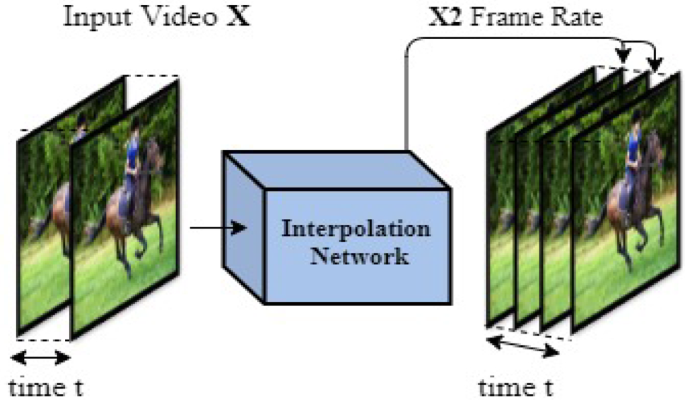
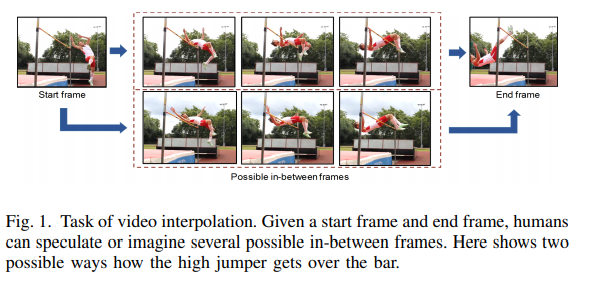
Video frame interpolation is a technique used to generate new frames of video content based on existing frames. It involves creating additional frames between the original frames to improve the smoothness and visual quality of video playback. Let’s explore how video frame interpolation works and its benefits in video production and playback.
Video frame interpolation utilizes advanced algorithms to analyze the motion and content of adjacent frames. Based on this analysis, the algorithm generates new frames that fill the gaps between the original frames. These interpolated frames are designed to seamlessly blend with the existing frames, creating the illusion of smoother motion and reducing the perception of jerkiness or choppiness in videos.
By inserting additional frames, video frame interpolation can increase the frame rate of a video. For example, if a video is originally recorded at 30 frames per second (fps), frame interpolation can create intermediate frames to enhance the perceived motion smoothness, making it appear as if the video is playing at a higher frame rate.
Improving video playback with frame interpolation
The use of video frame interpolation has several benefits in video playback and production, enhancing the visual experience and offering creative possibilities. Let’s delve into some advantages of frame interpolation in video playback.
Smooth motion: Frame interpolation reduces the visual jerkiness or stuttering often associated with lower frame rates. By adding interpolated frames, the algorithm smoothes out the motion between the original frames, resulting in more fluid and natural-looking video playback.
Enhanced visual quality: Frame interpolation can enhance the visual quality of videos by reducing motion blur and artifacts caused by rapid motion. The interpolated frames contribute to sharper and clearer visuals, improving the overall viewing experience.
In video production, frame interpolation offers creative opportunities for slow-motion effects, time manipulation, and motion control. By adjusting the frame rate and applying frame interpolation techniques, filmmakers can achieve unique visual effects and precise control over the perception of time in their productions.
In conclusion, video frame interpolation is a powerful technique that enhances video playback by creating additional frames between the original frames. By improving motion smoothness and visual quality, frame interpolation offers an enhanced viewing experience and opens up creative possibilities in video production.
Can frame interpolation affect video playback performance?
While video frame interpolation can significantly improve the visual quality and smoothness of video playback, it may also impact video playback performance in certain situations. Let’s explore the factors that can influence the performance of frame interpolation and how to mitigate potential issues.
The computational requirements of frame interpolation algorithms can be demanding, especially for high-resolution videos or when real-time interpolation is required. Processing the additional frames in real-time may strain the hardware resources of devices, leading to decreased performance or potential playback issues.
The impact on performance also depends on the complexity of the video content. Videos with highly dynamic motion or intricate details may require more computational power for accurate frame interpolation, potentially affecting playback performance on devices with limited processing capabilities.
To mitigate performance issues, it’s essential to consider the following:
Hardware capabilities: Ensure that the playback device has sufficient processing power and resources to handle frame interpolation effectively. High-performance devices with powerful processors and dedicated graphics capabilities can handle frame interpolation more efficiently.
Optimized settings: Adjusting the interpolation settings, such as the interpolation method or frame rate adjustment, can help optimize performance. Choosing a lower frame rate adjustment or utilizing more efficient interpolation methods can reduce the computational demands while still providing a noticeable improvement in video smoothness.
It’s worth noting that frame interpolation is not always necessary or desirable for all video content. Some viewers prefer the original frame rate and motion characteristics of videos, while others may appreciate


