
New AV1 codec: speed up video loading in the browser
In this tutorial, we will learn how to use video on the web, as it is in 2019. Chrome and Firefox have started to support the new AV1 codec; you can make a video for them in half.
Let’s talk separately about how to replace GIF with video in AV1 and H.264; then its size will be reduced by 20 to 40 times.
AV1 in the browser
YouTube is already using it on TestTube. Netflix said AV1 will be “its main next-generation codec.”
At Evil Martians we are already using it on our website and on Amplifer. In this article, I will share my AV1 implementation experience and show you step by step how to embed a video to make it work in all browsers.
Codecs and containers
With images, everything is simple: JPEG with PNG for all browsers or create more compact files in WebP for modern browsers. We can always be sure that the files will contain a .png PNG format (with the rare exception of PNG bombs, which imgproxy can protect against). Video files are more complicated. The file extension (,, or) only speaks of the container. While video files are made up of three different components:
.mp4.wmv.webm.mov
The video codec determines how much you can compress the video and what you have to sacrifice. The main video codecs on the Web are H.264, HEVC, VP9 and now AV1.
The audio codec compresses the audio. Of course, it is not necessary if there is no sound in the video. Popular choices are MP3, Opus, and AAC.
The container stores both video (compressed with some kind of video codec) and audio stream (compressed with some kind of audio codec). And also additional data such as subtitles and meta information. Popular containers: MP4, MOV, WebM.
When we see the extension of the .mp4 file, we can only tell that an MP4 container was used. But the codecs it contains may be different: the author could have taken H.264 and AAC, AV1 and Opus, or something else.
Behold AV1
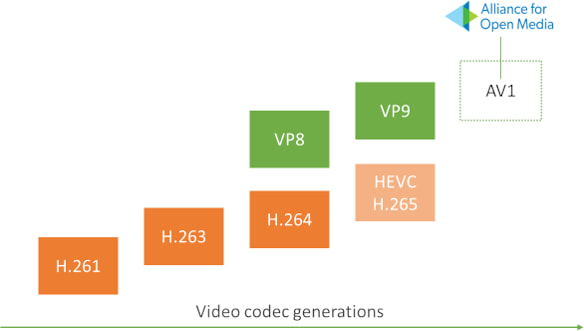
AV1 is a video codec that was released a year ago, in March 2018. It was created to surpass the previous generation of codecs: HEVC, VP9, H.264 and VP8.


